Sunday, October 21, 2018

Import and Export Database using ssh
mysql -u <database_username> -p -D <Your_databasename> < <database_path>
Example :-
mysql -u abcpanam_devuser -p -D abcpanam_abcpanama < abcdistr_abcpanama(1).sql
Export Database using ssh :-
[abcdistr@server ~]$ mysqldump -u abcdistr_ntf -p abcdistr_abcpanama > abcdistr_abcpanama.sql
IMPORT AND EXPORT DATABASE AT lOCALHOST USING TERMINAL
Connect Terminal to database
$ mysql -h 127.0.0.1 -u root
$ /opt/lampp/bin/mysql -uroot -ppassword
ntf-22@NTF-22:/$ /opt/lampp/bin/mysql -uroot (IF THERE IS NO PASSWORD)
IMPORT :-
ntf-22@NTF-22:~$ sudo /opt/lampp/bin/mysql>mysql -u root ssh_test_db < /home/ntf-22/Desktop/abcdistr_abcgrouptt.sql
ntf-22@NTF-22:~$ sudo /opt/lampp/bin/mysql>mysql -u <database_username> <database_name> < <downloaded_database_sql_file_path_at_your_system>
EXPORT:-
ntf-22@NTF-22:~$ /opt/lampp/bin/mysql>mysqldump -u root -p ABC_magento_db > ABC_magento_db.sql
ntf-22@NTF-22:~$ /opt/lampp/bin/mysql>mysqldump -u <database_username> -p <database_name> > <new_database_name.sql>

Basics Ubuntu Terminal commands
Some basics command to use terminal in Ubuntu Linux
S. NO
|
COMMAND
|
EXAMPLE
|
BRIEF DESCRIPTION
|
1.
|
cd <folder_name>
|
ntf-22@NTF-22:~$ cd /home/ntf-22/
|
To enter in a folder
|
2
|
cd ..
|
ntf-22@NTF-22:~$ cd ..
|
exit from a folder
|
3
|
cd /..
|
ntf-22@NTF-22:~$ cd /..
|
Exit from all folder and move at root
|
4
|
pkill <software_name>
|
ntf-22@NTF-22:/$ pkill geany
|
Used to close specific software.
|
5
|
<software name>
|
ntf-22@NTF-22:/$ geany
|
Open directly through terminal
|
6
|
ssh username@domain
|
ntf-22@NTF-22:~$ ssh ntf-15@192.168.1.101
|
Connect other system using terminal
|
7
|
sudo mv frompath topath
|
ntf-22@NTF-22:/$ sudo mv opt/lampp/htdocs/swati-drupal home/ntf-22/Downloads
|
Move folder from terminal
|
8
|
sudo frompath/foldername topath/folderRename
|
ntf-22@NTF-22:/$ sudo mv opt/lampp/htdocs/swati-drupal home/ntf-22/Downloads/swati-move
|
Move and Rename folder using terminal
|
9
|
grep sshd /var/log/auth.log
|
ntf-22@NTF-22:~$ grep sshd /var/log/auth.log
|
Know whoes access your system and when .
|
10
|
gksu gedit /etc/hosts
|
ntf-22@NTF-22:~$ gksu gedit /etc/hosts
|
Search your website which you want to unblock and delete, if you want to block add url of the site.
|
11
|
mkdir <filename>
|
ntf-15@NTF-15:~/Music$ mkdir tt
|
Creating folder using command
|
11
|
rmdir <filename>
|
ntf-15@NTF-15:~/Music$ rmdir tt
|
Remove Folder Using command.
|
12
|
pwd
|
ntf-15@NTF-15:~$ pwd
|
Print Current Working Directory
Show in which directory are you working. |
13
|
ls
|
ntf-15@NTF-15:~$ ls
|
Print List of Directory
|
14
|
history -c
|
ntf-22@NTF-22:/$ history -c
|
Clear history of open terminal.
|
15
|
cp -R source destination
|
ntf-22@NTF-22:~/Downloads$ cp -R /home/ntf-22/Downloads/testing /home/ntf-22/Desktop/
|
Copy and paste from terminal you can also copy and paste your file
|
16
|
zip -r folder.zip folder
|
ntf-22@NTF-22:~/Downloads$ zip -r testing.zip /home/ntf-22/Downloads/testing
|
Create zip file using terminal
|
17
|
pathwhereyouwanttoxtract$ unzip folder.zip
|
ntf-22@NTF-22:~/Downloads$ unzip drupal8.zip
|
Extract folder using terminal
|
18
|
$ passwd
|
ntf-22@NTF-22:~$ passwd
|
Change password for
system
|
19
|
$ scp source_path user@domain:/destinationpath
|
ntf-22@NTF-22:~$ scp /home/ntf-22/Downloads/test.php ntf-15@192.168.1.101:/home/ntf-15/Desktop
|
Put file in other system
|
20
|
$ scp user@domain:/path yourpath
|
ntf-22@NTF-22:~$ scp ntf-15@192.168.1.101:/home/ntf-15/Desktop/t.png /home/ntf-22/Desktop/
|
Get from other system
|
21
|
php -m
|
ntf-22@NTF-22:~$ php -m
|
it shows the list of enable module in php
|
22
|
php -m | grep <name of extention>
|
ntf-15@NTF-15:/$ php -m | grep ctype
|
Checking extension enable or not in your php server
|
23
|
sudo apt-get install php7.0- <name of extention>
|
ntf-15@NTF-15:/$ sudo apt-get install php7.0-dom
|
To install php extension in server
|

How to Connect ssh in ubuntu linux.
- Create ssh key
- Authorize key
- Download id_rsa.pub file
- Put this file at your system where ever you want. In my case i always prefer Desktop
- Open your Terminal
- Open Folder where have you put id_rsa.pub file like
ntf-22@NTF-22:/$ cd home/ntf-22/Desktop/
7) Now You will see like this
ntf-22@NTF-22:~/Desktop$
8) Here you have entered in Desktop folder
9) connect ssh using pub file
ntf-22@NTF-22:~/Desktop$ ssh -i id_rsa abcdistr@abcdistributionusa.com
10) Connect SSH when specific port is define
ssh -p 2222 abcpanam@162.241.224.18
ntf-22@NTF-22:~$ ssh -i id_rsa.pub -p 2222 abcpanam@abcpanamainc.com
The main ssh Connect command is (ssh -i <name_of_pub _file> username@domain)
In my case pub fille
name is = id_rsa
Username = abcdistr
Domain = abcdistributionusa.com
eg.
10) Enter Cpanel password
abcdistr@abcdistributionusa.com's password:
11) you will see like this
Last login: Fri Dec 15 09:39:53 2017 from 115.166.142.238
[abcdistr@server ~]$
12) You have successfully access using ssh but if you get ssh enable error then consult with help and support they will enable ssh for your account. :)
Saturday, October 20, 2018

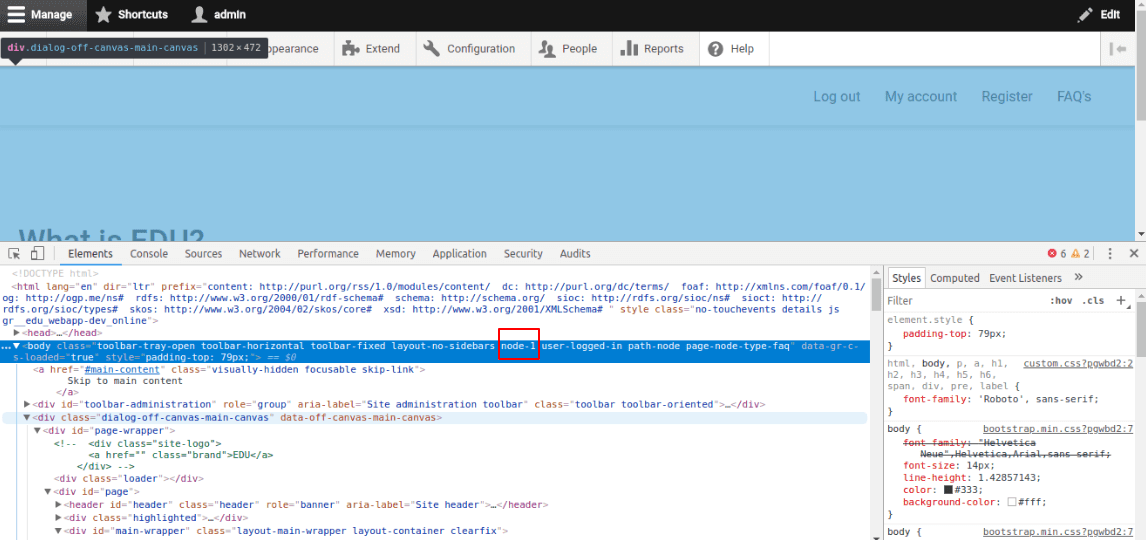
How to add missing node id in Drupal 8
Add Missing Node id in drupal 8 :-
By default node id will not be there in the drupal 8. to enable this you have to add this code in your .theme file ->
function THEMENAME_preprocess_html(&$variables) {
// Add node id to the body class.
$node = \Drupal::routeMatch()->getParameter('node');
if($node) {
$variables['attributes']['class'][] = 'node-' . $node->id();
}
}

Most important module list in Drupal 7
Sr. no.
|
Module name
|
Installation url
|
Brief Description
|
1
|
Administration menu
|
https://www.drupal.org/project/admin_menu
|
Used for drop down admin menu.
|
2
|
Front page
|
https://www.drupal.org/project/front
|
Used for different front page for anonymous and authentic user.
|
3
|
Backup and Migrate
|
https://www.drupal.org/project/backup_migrate
|
To take backup from site.
|
4
|
Ckeditor
|
https://www.drupal.org/project/ckeditor
|
For best html editor.
|
5
|
Flexslider
|
https://www.drupal.org/project/flexslider
|
Used for image slider.
|
6
|
Panel
|
https://www.drupal.org/project/panels
|
Create page layout for content type with block field and views.
|
7
|
Module filter
|
https://www.drupal.org/project/module_filter
|
Filter module from module name if you have lots of modules.
|
8
|
Newsletter
|
https://www.drupal.org/project/newsletter
|
For subscribe website it show a subscribe link with the form.
|
9
|
Pathauto
|
https://www.drupal.org/project/pathauto
|
Automatic provide path for content type and user and for all nodes.
|
10
|
poll
|
https://www.drupal.org/project/poll
|
Create online voting in drupal 7.
|
11
|
Views
|
https://www.drupal.org/project/views
|
Most important and backbone of Drupal.
|
12
|
Php filter
|
Core module
|
Enable to add php code field in text format of the block.
|
13
|
Entity reference
|
https://www.drupal.org/project/entityreference
|
Create taxonomy reference and relationship with view.
|
14
|
Webform
|
https://www.drupal.org/project/webform
|
To create contact form.
|
15
|
File (field) path
|
https://www.drupal.org/project/filefield_paths
|
Specify the diiferent storing path of image and other file for different content type and also create a diiferent folder for storing purpose.
|
16
|
String Override
|
https://www.drupal.org/project/stringoverrides
|
Replace the by default message text.
|
17
|
Calendar
|
https://www.drupal.org/project/calendar
|
To create calendar and filter date wise content with view.
|
18
|
Owl carousel
|
https://www.drupal.org/project/owlcarousel
|
Nice slider with fields like title body author name.
|
19
|
Colorbox
|
https://www.drupal.org/project/colorbox
| |
20
|
Menu Attribute
|
https://www.drupal.org/project/menu_attributes
|
Add class ,id, style, attribute to menu.
|
21
|
Modal form
|
https://www.drupal.org/project/modal_forms
|
Used for show all form in a popup.
|
22
|
Commerce wishlist
|
https://www.drupal.org/project/commerce_wishlist
|
Used to create fav. List or wishlist in drupal commerce.
|
23
|
Css injector
|
https://www.drupal.org/project/css_injector
|
To add css property from website or from admin dashboard.
|
24
|
Scroll to top
|
https://www.drupal.org/project/scroll_to_top
|
It added back to top arrow and scroll smoothly the page at top.
|
25
|
Sticky Navigation
|
https://www.drupal.org/project/stickynav
|
Used to create sticky menu.
|
26
|
Block Class
|
https://ftp.drupal.org/files/projects/block_class-7.x-2.3.zip
|
Used to add class to specific block.
|
27
|
Floating block
|
https://www.drupal.org/project/floating_block
|
To Create sticky block and you can also use both id and css for this.
|
28
|
Block Attribute
|
https://www.drupal.org/project/block_attributes
|
Used to add attribute in block like style, id, css.
|
29
|
Drupal Chat
|
https://www.drupal.org/project/drupalchat
|
Purpose of module chatting with other user.
|
30
|
Animate Any
|
https://www.drupal.org/project/animate_any
|
Animate any content of of page on page load.
|
31
|
Organic Group
|
https://www.drupal.org/project/og
|
Enable users to create and manage their own 'groups'.
|
32
|
Block Class
|
https://www.drupal.org/project/block_class
|
Block Class allows users to add classes to any block through the block's configuration interface
|
33
|
Responsive Menu
|
https://www.drupal.org/project/responsive_menus
|
Responsify your menus! Just give me a CSS/jQuery style selector of your menu and I will make it mobile friendly
|
34
|
Superfish Menu
|
https://www.drupal.org/project/superfish
|
Superfish integrates jQuery Superfish plugin with your Drupal menus.
|
35
|
TB Mega Menu
|
https://www.drupal.org/project/tb_megamenu
|
TB Mega Menu allows you to create a mega menu with an innovative back-end user interface and synchronized with Drupal core menu.
|
36
|
Quick Tab
|
https://www.drupal.org/project/quicktabs
|
The Quick Tabs module allows you to create blocks of tabbed content, specifically views, blocks, nodes* and other quicktabs*. You can create a block on your site containing multiple tabs with corresponding content.
|
37
|
Field Permission
|
https://www.drupal.org/project/field_permissions
|
The Field Permissions module allows site administrators to set field-level permissions to edit, view and create fields on any entity.
|
38
|
Panel Extra LAyout
|
https://www.drupal.org/project/panels_extra_layouts
| |
40
|
Menu Per Role
|
https://www.drupal.org/project/menu_per_role
|
This module allows you to restrict access to menu items based on user roles. Just activate the module and edit a menu item as usual. There will be a new fieldset that allows you to restrict access by role.
|
41
|
Twilio (Send Message To Phone)
|
https://www.drupal.org/project/twilio
|
The Twilio module provides integration with the Twilio cloud communication platform allowing for your Drupal site to integration Voice and SMS functionality.
|
42
|
Better Exposed filter
|
https://www.drupal.org/project/better_exposed_filters
|
the Better Exposed Filters module replaces the Views' default single- or multi-select boxes with radio buttons or checkboxes, respectively. Description fields and Select All/None links can be added to exposed filters to make for a better user experience.
|
43
|
Read More
|
https://www.drupal.org/project/readmore
|
Add read more link on body and show without refresh page.
|
44
|
Context module
|
https://www.drupal.org/project/context
|
Used for creating differnt layout for different content type and node it work as a panel module.
|
45
|
context by node
|
https://www.drupal.org/project/context_by_node
|
Context by node allows you to create a context for each node. The context created will apply just for that node.
|
46
|
context node
|
https://www.drupal.org/project/context_node
|
Context Node allows you to select a predefined context when creating a node.
|
47
|
Word count
|
https://www.drupal.org/project/wordcount
|
Count words according to creatore user /Used to see particular user creates node. Check in the report->word count
|
48
|
Read time
|
https://www.drupal.org/project/read_time
|
Display the recuired to read specific node.
|
49
|
Node view count
|
https://www.drupal.org/project/nodeviewcount
|
Display the total view of particular node and dispaly using default node.
|
50
|
Hierarchical Select
|
https://www.drupal.org/project/hierarchical_select
|
Display sub term of texonomy in hierarical.
|
51
|
Taxonomy menu
|
https://www.drupal.org/project/taxonomy_menu
|
Added sub term as sub menu of main menu
|
52
|
Feeds Module
|
https://www.drupal.org/project/feeds
|
Added multiple notes at a single import click using csv.
|
53
|
PDF using MPDF
|
https://www.drupal.org/project/pdf_using_mpdf
|
Used to generate pdf from html
|
54
|
Boost module
|
https://www.drupal.org/project/boost
|
Used to increase site performance.
|
55
|
File Entity
|
https://www.drupal.org/project/file_entity
|
Used to show file tab in admin section
|
56
|
Adminstration View
|
https://www.drupal.org/project/admin_views
|
Used to Show filters in administration section
|
57
|
Rabbit Hole
|
https://www.drupal.org/project/rabbit_hole
|
Used to Access denied on node but can display in the other format like view block , page , slider for annonumous user
|
58
|
Bean Module
|
https://www.drupal.org/project/bean
|
Used to add fields in cutom block in drupal 7
|

Top Drupal 8 Module list
S. no.
|
Module Name
|
Installation url
|
Brief Description
|
1.
|
Admin Toolbar
|
Provide drop-down dashboard menu.
| |
2
|
Block Class
|
Add class in Drupal 8 block
| |
3
|
Simple-news
|
Provide Newsletter and subscribe form.
| |
4
|
Language Switcher Drop-down
|
To create language switcher block with drop-down list.
| |
5
|
Twitter Block
|
Create twitter feeds block with latest tweets.
| |
6
|
Menus Attribute
|
To add CSS class and id in the menu.
| |
7
|
Font Awesome menu icon
|
For used fa icon in the site as footer, header , block.
| |
8
|
Font Awesome Icons
|
For used icon in the menus.
| |
9
|
Slick carousel
|
Awesome slider
| |
10
|
Path-auto
|
Used for auto decided path
| |
11
|
Image widget crop
|
Used for Crop image.
| |
12
|
Redirect
|
Redirect URL only at other page
| |
13
|
Context module
|
Used for creating different layout for different content type and node it work as a panel module.
| |
14
|
Coffee module
|
Work as a search bar for dashboard menu.
| |
15
|
Node View count
|
Show total view on the particular node.
| |
16
|
Node read time
|
Show how much time you will take to read the field.
| |
17
| D8 Editor Advanced link | ||
18
|
Commerce checkout page manager
|
Change the title and submit button level at checkout
| |
19
|
Views taxonomy term name with depth
|
Filter by term name.
| |
20
|
Simple hierarchical select
|
For taxonomy hierarchical
| |
21
|
Taxonomy menu
|
Added taxonomy sub term as a sub menu of main menu.
| |
22
|
PHP
| ||
23
|
Block user info
|
Used to show current user profile, author info, and user list
| |
24
|
Rabbit hole
|
Used to “Access denied”, “page not found” for anonymous user for a particular node but can visible content in view page block or in other format also.
| |
25
|
H5P
|
Used to create online Quiz for Drupal 7 or Drupal 8
| |
26
|
Quiz
|
Used to create online quiz you can set time for overall test in this.
| |
27
|
Bootstrap Alert message
|
Used to display a message on the top of the site at all pages
| |
28
|
Simple popup blocks
|
You can open any block view block, form in the o
And set according to the desire place like top left, center , top right etc.
| |
29
|
Entity reference exposed filters
|
If you want entity reference title field in exposed filter as drop-down.
|
Subscribe to:
Posts (Atom)