Showing posts with label Drupal8. Show all posts

Sunday, November 28, 2021

Drupal Coding standard (Drupal and DrupalPractice) Setup

 Hello Drupalers,

Hope all are good and healthy.

Today we are going to discuss about how we can keep our code according the Drupal coding standard. While we write any code we keep logics according the functionality but its also important to write code according the standard.

Now Question is how we can check our code is according to standard or not. So in Drupal we usually check according the Drupal and DrupalPractice Coding Standard.

First we have to install and setup phpcs and phcbf in our local repo.


 composer create-project drupal/recommended-project drupal_contrib  
 composer require drupal/coder dealerdirect/phpcodesniffer-composer-installer  
 vendor/bin/phpcs --config-set installed_paths vendor/drupal/coder/coder_sniffer/  
 vendor/bin/phpcs -i  


we have to run all phpcs commands from vendor/bin/phpcs because we are setting up standards with local repo.

after setup Drupal and DrupalPractice standard install need to check the installed version.
To check installed version run 

The installed coding standards are PSR2, Squiz, PSR1, Zend, MySource, PEAR, PSR12, Drupal, DrupalPractice and VariableAnalysis


That's it if you find the Drupal and DrupalPractice in installed version you can use the to check your code accordingly.


Commands to check code according the Drupal Standard.

 vendor/bin/phpcs --standard=Drupal web/modules/contrib/<Module_name>  
 vendor/bin/phpcbf --standard=Drupal web/modules/contrib/<Module_name>  
 vendor/bin/phpcs --standard=DrupalPractice web/modules/contrib/<Module_name>  

Thursday, March 19, 2020

How Drupal Core release version decides ?

Hello Drupalers,

There is one interesting thing about Drupal version.

Have you ever been thought how core contributor decided the Drupal release number ? 🤔


Today i am going to tell you how the core release version decide.

"Since Drupal 8.8.0 Core release follow the semantic versioning (semver) numbering system."

  • Semantic versioning numbering uses three numbers instead of two  i.e (8.2.6)

In 8.2.6 first number is the major release number, second is minor number and third is patch number .

First Number (Major version) :- You are actually breaking API , there's no backwards compatibility with old API.

Second Number (Minor version) :- Minor version does not break compatibility with old version (Drupal 8.2 won't break compatibility of 8.1), This number is used for big changes or new feature.

Third Number (Patch Number) :- last number only shows bug fixes.


For more information please visit :-  Drupal Core release cycle

"Most Welcome any suggestion and correction in blog".

Thanks 🙂

Headless drupal 8 with vue js

Hello Drupalers,

Today i am going to show you how can create headless website with  Drupal 8 and vue.


We will step by step to create headless website.

Step 1 : -  Install a fresh Drupal 8.  In my case i  installed drupal with composer .

 composer create-project drupal-composer/drupal-project:8.x-dev decoupled_drupal --stability dev --no-interaction  

Step 2 : - In this case we will use rest api to get  drupal content data in our vue app using "REST Module."


Step 3 :-  Create custom content type as  i have created content type "Album" and added some fields


Step 4 :- create view for rest export data.

 make sure your api path (i.e api/edm-album)


Note : Now Drupal is ready for headless use now we will create vue frontent to get this api data and will dispaly on frontent.


Step 5  :- Inside of your Drupal folder install Vue-cli wo we can use


 lenovo@lenovo-ThinkPad-L450:/var/www/html/decoupled_drupal/drupalvue $ sudo npm install -g vue-cli  

Step 6 :-  Setup Vue instance for headless use

 vue init webpack <name_of_project folder>  
 # install dependencies and go!  
 cd <name_of_project folder>  
 //install node dependencies from package json  
 npm install  
 // run this command to start your project  
 npm run dev  


Last command is used for serve react application and after that you will be able to see some url like

http://localhost:8080/


make sure you are running above commands from your drupalvue directory.


Saturday, November 17, 2018

Customization in drupal 8 core contact form using form alter

How to change Drupal 8 Core Contact form fleld label :-

 If you want to change Contact form "Message" field label you can use "hook_form_alter" .

either you can create a custom module or either you can add form alter in your theme file also.

 
function your_theme_form_alter(&$form, \Drupal\Core\Form\FormStateInterface $form_state, $form_id) {
       if ($form_id == 'contact_message_feedback_form') {
        $form['message']['widget'][0]['value']['#title'] = t("My Custom Body Label");
     }
} 


Add placeholder in default search using form alter

function your_theme_form_alter(&$form, \Drupal\Core\Form\FormStateInterface $form_state, $form_id) {
    if (in_array($form_id, ['search_block_form', 'search_form'])) {
        $form['keys']['#attributes']['placeholder'] = t('Search...');
    }
   }if ($form_id == 'contact_message_feedback_form') {
  $form['actions']['submit']['#value'] = t("My Altered submit button text here");
  $form['subject']['widget'][0]['value']['#title'] = t ("My Altered title here");
  $form['message']['widget'][0]['value']['#title'] = t("My custom body text here");
        //$form['message']['widget'][0]['value']['#title'] = t("My Custom Body Label");
  $form['#suffix'] = "<div class='extra-text'><p>Show some text before the comment form.</p></div>";
     }
} 

Monday, October 29, 2018

How to Change 'Any' option in exposed filter in Drupal 8.


If you Want to Change label of "Any" in exposed filter option in Drupal 8. You can use "Better exposed filter" . here thesome step to change of Any text in D8.

Step 1 : Open your Better exposed filter setting and find out the filter in which you want to change the label.

Step 2: Scroll down at the bottom select  "More options for "field_ad_category_target_id(your filter name)".


Step 3 : Click on "Rewrite filter options"


Step 4 : put this in "Retrite the text option"

 example : - Any -| Your option

Step 5: in my case i want to change "Any" label to 'Your option'. i hope this will work for you :)

Wednesday, October 24, 2018

My trick to add Colorbox popup on Slideshow images in Drupal 8

Hello, If you want to show any slider image in the popup form on click on image
here is the my funny or easy trick to do it. i hope it will work for you :)

Trick 1 :-  I have a task that i have created a slider using image fieldslideshow , i have done this by using view and just set image formatter as image fieldslideshow but now requirement is that when we click on the image it should be open as colorbox popup.


solution : -
   step 1 :- I have added a same image field in view and set formatter "colorbox" and excluded that filed, its all because shwo we can found colorbox library on required page.

step 2 :-  just change twig file structure according colorbox :-

From :-

{% for key,value in url %}
            <img src="{{ value }}" />
        {% endfor %}


To :-

{% for key,value in url %}
    <a href="{{ value }}" class="colorbox cboxElement"><img src="{{ value }}" /></a>
    {% endfor %}

Step 3 :- Now you will be able to see popup on your slider image


Trick 2 - Need to add popup on field slide show image.

Step 1:- i have set filed slideshow on display format of image and link image to file.

Step 2:- create a other image field to and set Colorbox format to call Colorbox library, set a default image in this field, disable from disaplay form, and just add Css for display none.

Step 3 :- there is same structure which we want for colorbox popup except colorbox class so i have  added class using jquery

jQuery('.field--name-field-product-image .field-slideshow').find('a').addClass('colorbox cboxElement');


How to Show all products and node related to the node user


When we click on the node or product and you want to show show all the products related to the user who publish the current user. you have to apply filter user id filter i am showing you in the below post.


Step 1 : - Firstly you have to change the "url alias" for the node and need to add author name.

eg. if you have product content type your path pattern should be like              
 ( [node:title]/[node:author] ) this.

path pattern:- [node:title]/[node:author]


Step 2 :- You Need to add "user Name" contextual filter in the view block.
if your url link this ->  
http://115.166.142.238/souq_alhrag/ar/samsung-galaxy-j2-core/customer

http://<ip>/<projectname>/<language>/<nodeid>/<username>

select raw value under "Provide default value"and path alias 2 in my case.


Exclude current Node in Block view in Drupal 8

If you want to exclude current node and product in block view in drupal 8 pls follow the below steps.


Step 1 :-  Create a block view.

Step 2 :-  Add Content Under "Contextual Filters", select "Provide Default value"->"Content Id from url"


Step 3 :- Scroll Down at bottom and Check "Exclude" under "More".

 
Step 4 :- Apply filter and save changes , now only content id which is the url doesn't show in the block view.

Saturday, October 20, 2018

How to add missing node id in Drupal 8

Add Missing Node id in drupal 8 :- 


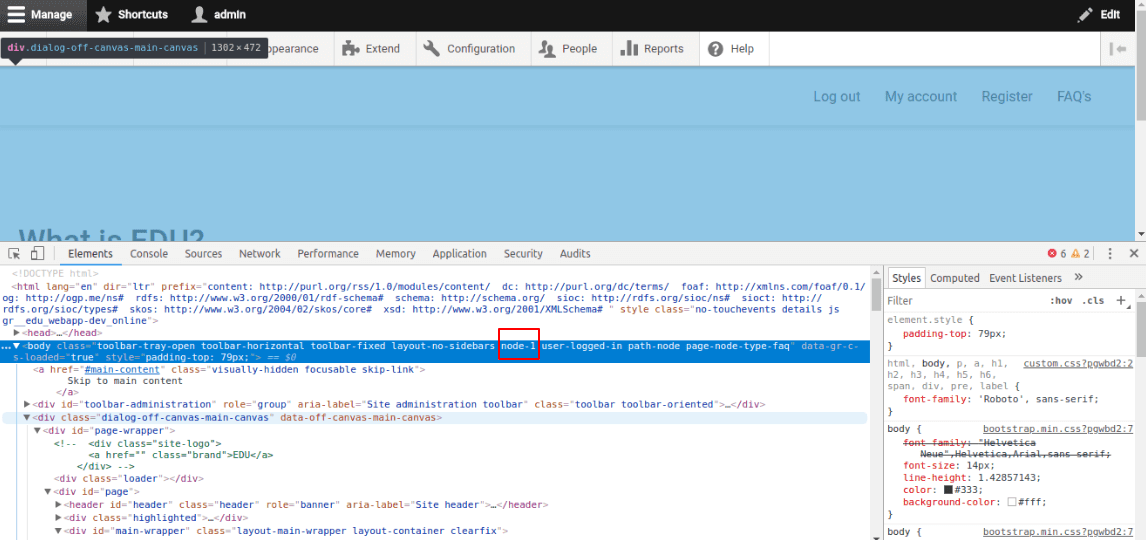
By default node id will not be there in the drupal 8. to enable this you have to add this code in your .theme file ->

   function THEMENAME_preprocess_html(&$variables) {  
    // Add node id to the body class.  
    $node = \Drupal::routeMatch()->getParameter('node');  
    if($node) {  
     $variables['attributes']['class'][] = 'node-' . $node->id();  
    }  
   }  

Top Drupal 8 Module list


S. no.
Module Name
Installation url
Brief Description
1.
Admin Toolbar
Provide drop-down dashboard menu.
2
Block Class
Add class in Drupal 8 block
3
Simple-news
Provide Newsletter and subscribe form.
4
Language Switcher Drop-down
To create language switcher block with drop-down list.
5
Twitter Block
Create twitter feeds block with latest tweets.
6
Menus Attribute
To add CSS class and id in the menu.
7
Font Awesome menu icon
For used fa icon in the site as footer, header , block.
8
Font Awesome Icons
For used icon in the menus.
9
Slick carousel
Awesome slider
10
Path-auto
Used for auto decided path
11
Image widget crop
Used for Crop image.
12
Redirect
Redirect URL only at other page
13
Context module
Used for creating different layout for different content type and node it work as a panel module.
14
Coffee module
Work as a search bar for dashboard menu.
15
Node View count
Show total view on the particular node.
16
Node read time
Show how much time you will take to read the field.
17
D8 Editor Advanced link
18
Commerce checkout page manager
Change the title and submit button level at checkout
19
Views taxonomy term name with depth
Filter by term name.
20
Simple hierarchical select
For taxonomy hierarchical
21
Taxonomy menu
Added taxonomy sub term as a sub menu of main menu.
22
PHP

23
Block user info
Used to show current user profile, author info, and user list
24
Rabbit hole
Used to “Access denied”, “page not found” for anonymous user for a particular node but can visible content in view page block or in other format also.
25
H5P
Used to create online Quiz for Drupal 7 or Drupal 8
26
Quiz
Used to create online quiz you can set time for overall test in this.
27
Bootstrap Alert message
Used to display a message on the top of the site at all pages
28
Simple popup blocks
You can open any block view block, form in the o
And set according to the desire place like top left, center , top right etc.
29
Entity reference exposed filters
If you want entity reference title field in exposed filter as drop-down.